Destinations
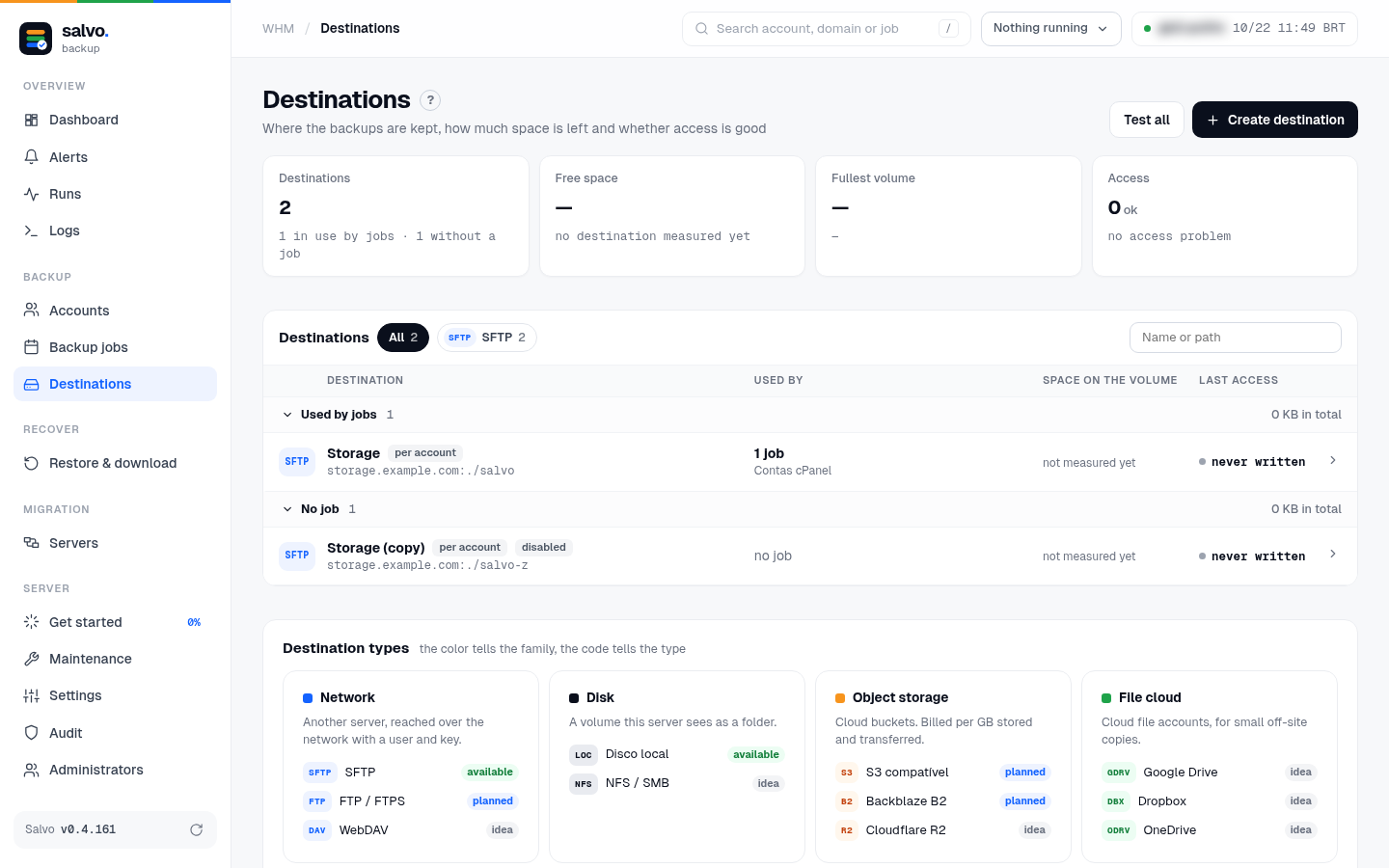
A destination is where the backups are kept: an SFTP server (another server, reached with a user and a key or password) or a folder on this server. The first one is created in Get started or imported from JetBackup.
● available Edit a destination: 0.4.127. Duplicate, enable and disable: 0.4.161.
Test and measure
On the screen: Destinations › Test all, or the destination's card › Test connection. The test goes step by step: network, SSH (server key and login), the folder, writing and reading a test file (deleted right after) and the latency. The free space is measured at the end of every backup, or by Measure now.
/var/lib/salvo/salvo destination-test --destination ID
/var/lib/salvo/salvo destination-measure --destination ID
Edit a destination
On the screen: Destinations › the destination › Edit opens the drawer Edit destination:
| Field | |
|---|---|
| Name, Host, Port, User | |
| Authentication | Keep the current one, New key or New password |
| known_hosts | only when the host or the port changes; Fetch from the server gets it |
| Path on the server | the folder of the backups |
| Compression | None, Fast or Balanced |
| Connections at once | 1 to 32; more keep a slow storage disk busy |
| Local cache (MB) | per account; 0 = no cache (what it is) |
Rules:
- Only what changed is saved.
- A change of access (user, key, password) or of place (host, port, folder) is tested first. If the test fails, nothing is saved (The test failed: nothing was saved).
- A change of place is a sensitive action and may ask for the app code.
- If the destination already keeps backups, the old place becomes an archived destination: inactive, with the archived seal, used only to restore the backups that are there.
- Every edit goes to the Audit.
On the command line:
# only the options you pass change
/var/lib/salvo/salvo destination-edit --destination ID --name NAME
# a new place: host, port and folder (tested before saving)
/var/lib/salvo/salvo destination-edit --destination ID --host HOST --port PORT --path /FOLDER --known-hosts-from /root/known_hosts
# new access: a key or a password from a file (an argument shows in ps)
/var/lib/salvo/salvo destination-edit --destination ID --user USER --key-from /root/new-key
# compression (nenhuma, zstd-fastest or zstd), connections, cache
/var/lib/salvo/salvo destination-edit --destination ID --compression zstd-fastest --connections 4 --cache-mb 0
A new compression applies to what is written from then on; what is already in the destination stays as it is: the Salvo engine reuses the content already on the storage, so what was written uncompressed stays uncompressed. To start over with the new compression, use a copy in a new folder.
Local cache
What it is. A local copy of what the Salvo engine needs to know about the storage: the indexes of the blocks
already written and the list of folders and files of the backups. It lives in one folder per account
(cache-<destination>-<account>) in Salvo's state directory, so a backup or a restore does not fetch all of that from
the storage every time. Nothing of it goes to the destination.
Two settings:
| Setting | Where | Default |
|---|---|---|
| Size (MB, per account) | the destination's Edit › Local cache (MB); for new destinations, Settings › New destinations › Local cache for new destinations | 256; 0 = no cache, everything is read from the storage |
| Keep each account's cache between runs | Settings › New destinations | No: the cache is deleted when each account finishes. Applies to every destination (only the size is per destination) |
Keep it (Yes):
- Gains: the next backup does not download the indexes and lists again (less reading on the storage, a faster account, above all with a remote or busy storage), and finding and browsing for a restore open faster.
How much it takes. The size is a limit per account, not reserved space: each account keeps only what it needs, up to that limit. A small account usually takes much less.
The worst case is every account full up to the limit. On a server with 20 accounts and the default limit of 256 MB, the kept cache can reach 5 GB (20 × 256 MB). On a server with 700 accounts, up to 175 GB.
That is why the default is not to keep it: on a server with many accounts, that space may be missed. With few accounts and room on the disk, keeping it is worth it.
/var/lib/salvo/salvo config --set destino_cache_manter=sim     # keep (nao = delete, the default)
/var/lib/salvo/salvo config --set destino_cache_mb=256         # size for new destinations
/var/lib/salvo/salvo destination-edit --destination ID --cache-mb 256   # size of one destination
Duplicate, enable and disable
On the screen: Destinations › the destination › Duplicate creates a disabled copy, already working: same settings, key, password, known_hosts and repository passwords. In the same folder it opens what is already there; in a new folder it creates the repositories with those passwords. The name is "name (copy)", numbered if it repeats. While it is disabled no job writes to it, and everything can be edited.

Enable / Disable turn a destination on and off. Disabling is refused while an active job writes to the destination: move or pause the job first. A disabled destination shows the disabled seal in the list. Both go to the Audit.
/var/lib/salvo/salvo destination-duplicate --destination ID [--name NAME]
/var/lib/salvo/salvo destination-enable --destination ID          # enable
/var/lib/salvo/salvo destination-enable --destination ID --off    # disable
Change the folder or the compression of a destination in use
- Duplicate the destination.
- Edit the copy: a new folder, compression Fast.
- Enable the copy.
- In Backup jobs, edit the job and point it to the copy (or
job-edit --job N --destination ID).
The original keeps its backups for restoring; disable it when no active job uses it.